Archive | Uncategorized RSS feed for this section

Interacting with Attiny85 Microcontroller Development Board

20 Jan

Ok gais, on shopee we could see lots of attiny85 dev board. its small and directly powered and can be programmed using usb A.

This is good for small project which use less pin.

In my case, im using it just to run single servo and some led, or perhaps simple display.

In order to use it you need to:

open Arduino ide and then go to preferences and then in additional board manager url paste this given url for Digispark :-

http://digistump.com/package_digistump_index.json

Now go to boards manager and download the Digispark boards.

Once done,

download and install the driver 1st here,

https://github.com/digistump/DigistumpArduino/releases

select the given settings:

Board- Digispark Default 16.5mhz

Programmer – micronucleus

And hit upload button and you’ll get a message at very bottom on arduino ide to plug the device within 60 sec then plug the device and if everything worked fine then you’ll get a message micronucleus done thank you that means code has been uploaded and your led will start blinking.

Reading Data From SD Card to Serial Terminal [Arduino]

3 Nov

Good day, its been years since my last post.

As i browse the net, im looking for way to download SD card data directly to my laptop without needing to unplug the sd card from arduino sd card reader.

This save me a lot of trouble and reduce wear and tear on those cheap card reader

My card reader:

MicroSD Card Reader (SPI Communication)

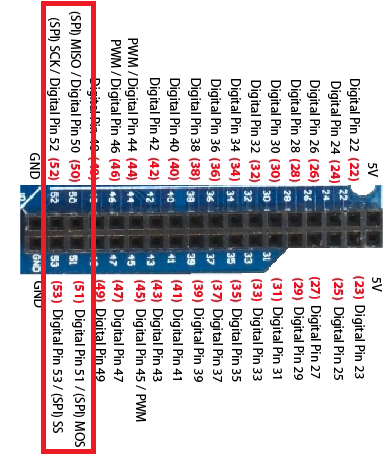
And my interface is with Arduino Mega (you can use any arduino board as long as the connection is to the SPI and no other SPI device connected)

The code below written for Arduino UNO i think hence the pin attachment. For mega it would be at:

Arduino Mega double pin layout

Code:

/*
  SD card file dump

  This example shows how to read a file from the SD card using the
  SD library and send it over the serial port.

  The circuit:
   SD card attached to SPI bus as follows:
 ** MOSI - pin 11
 ** MISO - pin 12
 ** CLK - pin 13
 ** CS - pin 4 (for MKRZero SD: SDCARD_SS_PIN)

  This example code is in the public domain.

*/

#include 
#include 

// const int chipSelect = 4;

void setup() {
  // Open serial communications and wait for port to open:
  Serial.begin(9600);
  while (!Serial) {
    ; // wait for serial port to connect. Needed for native USB port only
  }


  Serial.print("Initializing SD card...");

  // see if the card is present and can be initialized:
  if (!SD.begin()) {
    Serial.println("Card failed, or not present");
    // don't do anything more:
    while (1);
  }
  Serial.println("card initialized.");

  // open the file. note that only one file can be open at a time,
  // so you have to close this one before opening another.
  File dataFile = SD.open("data.csv");

  // if the file is available, write to it:
  if (dataFile) {
    while (dataFile.available()) {
      Serial.write(dataFile.read());
    }
    dataFile.close();
  }
  // if the file isn't open, pop up an error:
  else {
    Serial.println("error opening data.csv");
  }
}

void loop() {
}

So Basically this would try to find data.csv and read it. you guys can change it to any filename stored.

Using WAVECOM FASTRACK with Arduino

22 Feb

Assalam and Hi to all,

Im going to share something today which related to wavecom modem. 

Yeah, this modem is quite cheap so its been my favourite to use in any GSM project. 

So, here are some of the tips when using this modem:

  • Dont use software serial with this modem, u need to use pin 0 and 1 in order for it to work. [yet to find out why]
  • You need to short the RTS and DTS

So i guess that would be all on this. If you guys need help do not hesitate to sms/whatsapp me at 0132505732

DS3231 Library

18 Mar

Hi,

Recently I’ve been searching library for DS3231 RTC. The problem is, all of it is designed for Arduino IDE before V1.0

So, in order to make it compatible:

In DS3231.h:
Change <Wprogram.h> to <Arduino.h>

In DS3231.cpp:
Replace all “Wire.send” with “Wire.write”.
Replace all “Wire.receive” with “Wire.read”.

After that the DS3231_test example compiles without error.


*Based on Eric Ayers DS3231 library


Wireless Telemetry For Hexcopter

10 Jan

Hi,

Objective: To get data [Voltage, Temperature] from Hexcopter

Ideas: Xbee as wireless tranceiver

Item:

  1. Arduino Uno/Duemilanove x2
  2. Xbee x2
  3. Several resistor
  4. Battery
  5. LCD Shield

And the result:


IMAG0005

Wireless Communication using GSM Modem

22 Jun

Wireless Communication between Arduino and PC using XBee

21 Jun

News: New Online Shop

17 Jan

Please go to:

http://www.rcbotz.com

FYP Project Consultation

11 Sep

Salam/Hi

Currently Im taking FYP project consultation job. Anyone who happen to stuck doing their project might contact me for consultation.

Area of expertise:

  1. Arduino
  2. PIC16/18
  3. Driver Motor
  4. Wireless Communication [Bluetooth, Wifi, Zigbee]
  5. Uart/Serial/TTL
  6. Analog to Digital and Digital to Analog
  7. RFID 13Mhz

Do SMS me at o1325o5732 – For Malaysian’s

Overseas please use comment box.